- DATE:
- AUTHOR:
- The Krisp team
Web updates for July 13-19: Call Center AI
This batch of updates introduces the Enterprise Analytics Portal for sharing team analytics with enterprise clients and adds agent screen recording to Speech Analytics. Admins also get more control over Voice Translation and Accent Conversion, along with a complete audit history for Agent Voice Verification.
Feature updates and key enhancements:
Introducing the Enterprise Analytics Portal: Enterprise clients can now view analytics for the teams BPOs run for them in a dedicated portal. They can see overall performance and drill down into each team without waiting for manual reports. The BPO's Team Admins approve access for each team and can revoke it at any time. Every change is logged. Contact your Krisp Customer Experience Manager to get started.
Agent screen recordings in Speech Analytics: Admins can now enable agent screen recording and watch the recordings in call details, alongside the audio and transcript, giving QA teams full context when reviewing interactions. The screen is captured during active calls only, and Admins can turn it on from Speech Analytics settings.
Full history for Agent Voice Verification: Admins can now see the complete history of each agent's voice verification in audit logs. The logs record when an agent is enrolled, when they give or decline consent, and when Krisp flags a possible voice mismatch. This gives Admins a clear record of agent identity for compliance reviews.
Accent Conversion auto-switch based on CCaaS skills: Admins can now map CCaaS skills to languages once, and Krisp will automatically turn Accent Conversion on for English calls and off for other languages. Accent Conversion runs exactly where it improves the call and stays off where it isn't needed, without any extra actions from agents.
Call end detection based on call context: For teams using Krisp Bridge with Voice Translation, Krisp can now detect from the call context when a call ends. It summarizes the call and turns Voice Translation off, with an optional heads-up to agents. This keeps translation running only during actual calls. Admins can enable it from the Call Content tab; off by default.
Translation voice that matches the caller gender: Voice Translation now picks a translation voice that matches the customer’s gender. Calls sound natural on both sides. On by default; can be controlled in Voice Translation settings.
More control over customer voice change alerts: Admins can now choose how agents are alerted when a new speaker is detected on the customer side in translated calls. Agents can receive both an on-screen notification and a whisper tone audible only to them, or the notification alone. The whisper tone is enabled by default when Customer Voice Change Detection is turned on.
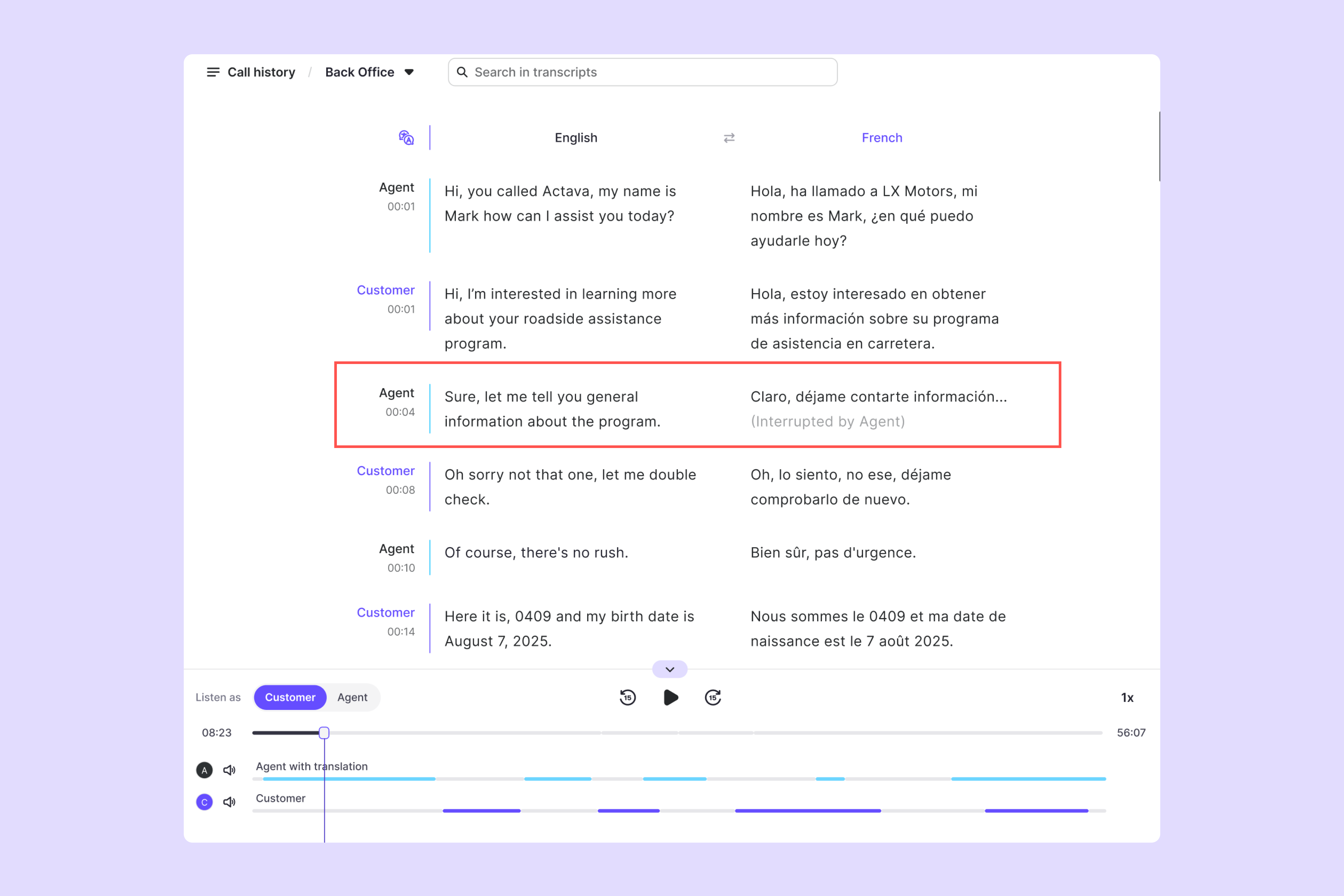
Interrupted translations and Quick Phrases in Call details: During translated calls, agents can drop their translation playback when a customer jumps in, or play preset Quick Phrases for routine lines like greetings and disclosures. Call details now show both: where a translation was interrupted and which Quick Phrase was played. Reviewers understand exactly what happened on the call, so agents are evaluated fairly.
Bug fixes
Improved Voice Macro uploads: Admins can retry uploading right away after picking an unsupported file.
Cleaner Call History for team members: Call History now opens reliably for members with the User role.
That's it for this release. Want updates like this in your inbox? Subscribe to the What's new page and receive every release update as it ships.